I know you are honest to earn money from Bangladesh. But, the ways to earn money is not transparent. Because, there are a lot companies online who pays you well. On the other hand there is no lack of scam website's who will never pay you for your work. Anyway, I know a proper direction can make you a common sense to earn properly from Bangladesh. We have a highly possibility to earn form internet. That's why I'm writing this post to help you to involve you in the right way. Follow the instructions below before going to the next step to earn.

Think about my Assessments
  • Don't be lazy. No one will give you money without doing anything. Make ready yourself to do work to earn money. Just read the whole content carefully and follow the instructions.
  • The most important thing in any way to earn is your mentality. If you are mentally sure to earn from online, you are welcome to my help desk.
  • Patience is the success of key in online related jobs. If you are always busy to your dream and want earn dollars without doing nothing, you are out of earning range.
  • It's true that many of the guys come online & get engaged to many online websites who tempts you a large amount. And they never pays, the guys get frustrate in making money online from Bangladesh.
Problems working from Bangladesh online   
You should not think Bangladesh is lagged behind making money online than other countries. Daily a vast amount of people are getting involved in online related jobs to Make money from Bangladesh. But, we are facing the only one and major problem. It's the payment method. We work online to earn money. But, if we can not get our money in our pocket, what's the benefit of working? The most useful, transparent, trusted & swift electric payment system is PayPal. But, hence PayPal does not support Bangladesh. It's our bad fortune. But, hopefully PayPal will include Bangladesh in next 1 year.
What's the better payment option from Bangladesh to get paid? 
Probably you are now hopeless about your online earnings? Don't be so. We have some alternative ways to get paid online. Now, you can get paid directly to your Bank Account (Wire Transfer). Even Alert-pay (PayZa) is also popular payment method in our country. You also can easily get payment from your Payoneer debit card. Even some advertising companies issue your amount via check. So, it's still easy to get paid form Bangladesh online.
Some Trusted Websites to work for Beginner From Bangladesh
Finally I would like to share some trusted websites to work from Bangladesh. You will get 100% payment from these websites. And you don't have to pay to register for these websites to register. Even you don't have to wait to get approved your account. And there is plenty of work for you. Just Register in those websites and start earning.
  1. minuteworkers.com
  2. microworkers.com
  3. microlancers.com
  4. clickchores.com
  5. ezmicrojobs.com
Work for those websites and you will be paid in time.
Remember that... working only one website will not bring you too much money, You should work in multiple accounts to get a handsome amount every month. Because, you will be given a fixed number of tasks every day from each of the sites. So, Sign up on all of the mentioned paying website's & increase your earnings. If you have any question regarding working online, you can contact with me on my Cell

Contact:
Mahbub Hasan Rajib

Mobile: +8801724986833
Continue Reading ...

create/ register account microworkers - If you are ready to earn money from Microworkers.com, you must have an account there. Only the registered members from microworkers can work on behalf of their company.

You know that it's free to create/ register account in it. To create the account you must have your own email address to verify it. It's the only one process to starting earning in microworkers. So, just follow me to register with micro-workers and start earning instantly.

  1. Go to this link www.microworkers.com/signup.php

  2. Now you will find the page like this

    Fill all the required fields. Use your full name (your payee name), enter your email address, create a password (remember your password), select your country and click on "Submit" button.

  3. Login to your email address (which email was used to create the account). Here you will find a confirmation message has sent to you from microworkers. Open the message and click on active link.

  4. After clicking the link you will be redirecting to your micro-workers account. If not please login with your email and password (the email & password you chose to create the account).

  5. Now, you are 100% done. Go to work place and find out your preferable works there and start earning money with your favorite microworkers.com.


Now, let me know if you have any other question about Micro-workers.com You can get some other valuable suggestions from me just sending me a mail or posting a comment under this post.

Continue Reading ...

Microworkers review -You can make money with microworkers online. People like microworkers for its easy works. This complete microworkers review will provide you all the necessary information about it like ...

  1. Is microworkers legit or scam?
  2. Registration Fee & other requirements
  3. How much money you I earn from microworkers.com?
  4. Type of work & Payment Guarantee
  5. microworkers payment process/ options
  6. microworkers Payment Proof
  7. Benefits of working with microworkers
  8. Problems about this site
  9. Special tips to earn more on this site


Microworkers Review

Is microworkers legit or scam?


Well. When you are new to online work, you should consider before working on any site. Because there are too many scam website's online who don't you pay at all. The scam websites will tempt you with big amount. And finally they will not pay you at all. But, I can certify that microworkers.com is a legit website.Now a days it's very much popular for all the other people to work with microworkers.com for it's transparency in dealings. You can search other review online for this company and all of them are making positive review as well as me.


Registration Fee & Other requirements


It's very much pleasant to work with microworkers. Because, it have no problem with registration. No registration fee is required to join with this company. No, extra experience is needed to work with this company. You have to join to microworkers.com for free and you can make money instantly without waiting for anything. Like other freelancing companies you don't need to give any test to start working. You should have Gamail, Yhaoo, Hotmail, Skype, Twitter, Facebook, Myspace, Badoo, Digg, Linkedin etc accounts. Because, when you are going to start working these accounts will be needed.

How much money can I earn from microworkers.com?


If you are new to online money making sector, then you should not think that you will earn thousands of dollars per month. You have to be more experienced. So, be expert working with this website. Actually there is no actual amount for per work. I found natural minimum amount for each project $0.10 & max to $2.00 There are many projects available on microworkers.com So, if you are a hard working person you can earn minimum amount of $15-$20 per day. Actually it depends on your working experience & speed. The more time you will work on this site, you will be able to get knowledge and make more money quickly.

What type of work you have to do ?


There are several types of work in this website. Most of the work is very easy & can be done quickly. The types of work is simple sign-ups, social bookmarking tasks, adding comments, creating backlinks, voting up contest entries, forum participation, downloading applications, website visits, suggesting leads, writing reviews or articles, rating videos or articles, and so much more.

What is the payment option/ method of microworkers.com?


Getting money is our goal to work. So, microworkers.com has given you three major options to make your payment process. You can withdraw your money via Payza (Alertpay), Moneybookers & Paypal. When you Signup & login to microworkers.com. Then go to "withdraw" tab. Your account will be on "Payment Hold" by default. When you reach $10 in your account, they will send you a PIN code straight to your address. It may take up to 4 weeks according to your country. When you get the PIN code, use it to your account and make your account address verified. Then you will be able to withdraw money without any problem. The minimum payout amount is $10.

Microworkers Payment Proof


You may want some payment proof of microworkers.com to believe deeply. That's why I have collected some payment proof of microworkers. Here is some of them ...

Benefits of working with microworkers


I love this company for various reason. You may also like them for some benefits. I got some major good sites on it. Like ...

  1. Anyone all over the world can make money using microworkers.com
  2. We don't need to wait for account approval.
  3. You don't need to search for work daily.
  4. You don't need bid for work.
  5. If you want you can surely earn some dollar daily.

Problems about this site


I faced some problems working with this company. There are many spammer who doesn't pay you at all. Even if you appeal with project proof, sometimes you will not be paid. And you works success rate will go down. But, it is not a usual factor. Moreover, there is not enough work for people from Asia. You may learn that people from European countries get a lot of projects to perform daily. But, if you are from Asia you will get limited number of work. Sometimes the number of work is too poor.

Suggestion


This trick is only applicable for people from Asia. If you want earn handsome amount online, you should be more handsome and trickery. You may have somebody (relative) in European countries. Firstly, open account on microworkers.com from your country in Asia. When you reach $10 then verify your account with the foreign address. By this time you can handle your account from your country in Asia. So, you will get more and more projects daily to make a lot of dollar per day.

Continue Reading ...

What is Facebook? How to Create a Facebook Account? - Facebook is worlds no 1 social networking website. It has launched on February 2004 by Harvard student Mark Zuckerberg. According to 2012 it has almost 996 million of users. Citizens from any community & country are allowed to create facebook account. They are allowed to add their personal information in the account. Moreover they are allowed to share images, music, videos, files, informations etc among their friends. The users are able to search their friends by name, location, school & college. The new feature is facebook with Skype. It's the most useful ways for all the facebook users. Now, you can make free calls allover the world without spending a single penny using facebook with skype. In facebook you are also allowed to make group discussion. Even you can create fan page here. If you are going to be a fan of a fanpage you will get all the updated information to your facebook account. So, it's time to create a facebook account for free to connect with your friends, family & virtual attractive people.

How to Create facebook account?

Well follow the following steps to create facebook account easily.
  1. Go to Facebook.com.
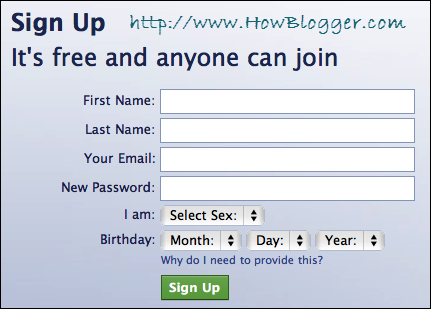
  2. Now you will see a sign up form in the homepage. Fill all the required fields. Like: First Name, Surname, Your Email, Re-enter Email, New Password, Your gender, Birthday.
  3. Click on Sign up button.
  4. Now you will be in the next step. Facebook will ask you search friends via email accounts. if you have contacts in yours Gmail account, select it and type your Gmail account & click on Find Friends.
  5. Now you are in Step 2. Fill all the required information and Click Save & Continue.
  6. In Step 3 you are told to upload your profile picture. Click on Upload a photo or Take a photo to pick up from your Webcam. Then select your photo, Click on Save & continue.
  7. You are done now. Your new account of Facebook is now created. The next step is to verify your email.
  8. To verify your account go to your email address and click on the verification link of the email send you by Facebook.
Now, your facebook account is 100% useable & never will be disabled if you follow the rules of Facebook.
Continue Reading ...

Hide Facebook account from search & block unwanted person

Facebook is One Social Media Website that has a highly reputation all over the world. That's why many spammar has been doing some disturbing activities. So, Facebook authurity has taken some strict steps to protect your profile information , images, videos and much more. Now, you can hide yourself from facebook search. There are several ways to hide your facebook profile. Depending on your demands you can configure your facebook profile visiblity. You can ...

Hide from public search

Many people online want to hide them from facebook search. It's a very good practice to be far away from the hackers online. The following steps will allow you to hide your facebook profile from search. Sign in to your Facebook Account Click on the Arrow (beside HOME) ? Account Settings
Facebook Account Security
  1. Select "Security" tab and click on "Deactive Your Account".
  2. Go to "How You Connect" section and a popup will come up.
  3. Now, check your option beside "who can look you up using the email address or phone number you provided?" section. Now Select anyone of the options and Save Settings.
Note: You have 3 options like you can let you to come on search only for your "friends", "friends of friends" and "everyone". If you select Friend option in this section, your profile will not be visible when an unknown person searches in facebook. Even you will be hide from the other search engines searches like Google, Yahoo, Bing etc.

Hide your profile from Specific person

This option will allow you to block some specific person you want. Follow the following options to block people from your facebook account.
  1. First of all Login to Facebook
  2. Click on the Arrow (beside HOME) ? Go to Privacy Settings & Select Manage Blocking in the sector of Blocked and Apps Section.
  3. Now, in the Block User Section write the name or email address of the users you want to block from Facebook friend list. Next Click on Block.

Hide Your Facebook Profile when signed out

This Facebook privacy option will give you some special offer. Like: when you will sign out from your facebook account your facebook profile will be hidden from everyone of facebook. But, when you are back again in facebook you will see your facebook account as usual. Follow the following steps to active this privacy.
  1. Sign in to your Facebook Account
  2. Click on the Arrow (beside HOME) → Go to Account Settings
  3. Select Security tab and click on Deactivate Your Account.
  4. Choose This is Temporarily, I will be back and click on Confirm
  5. Enter your Facebook password to Confirm the action & click on De-active Now.
Continue Reading ...

Optimize Blogger Post Title for More Traffic - Boost your website's traffic modifying h3 tag to h2... I am surely that you noticed, when a webpage is opened, it has a heading. When you open your newspaper, it also has a heading. These headlines are used to give a overall sense about the whole content. But, there are different kind of headline makers online in our websites. We have h1, h2, h3, h4, h5 & h6 tags. These are called Heading Elements. They are very much significant for a better SEO. But, they are not important equally.
Optimize Blogger Title To Get More Traffic

Importance of h1, h2 & h3 Tags

The h1 tag is most important. Generally, this

tag is used at the top of the website as Website Title. This Tag contains the main keywords of the website. The second important heading tag is

. You may know that all the search engines call and arrange all the contents in search results according to post heading. This

tag is used in this post title. But, in default blogger template

tag is used to make title of posts/pages. As we know that the

tag is most important and the lower are less important than other. So, it will be better SEO for our blogger blogs to change title tag from

tag to

.

Now Replace The H3 Tag with T2 Tag

Follow the following method and so the best seo for your blogger blog.
  1. Login to your Blogger Account.
  2. Go to Dashboard → Template → Edit HTML 
  3. Backup your template (Download Your Template)
  4. Check the box of Expand Widget Template.
  5. Find the following code by pressing Ctrl +f
  6. .post h3
  7. Replace all the .post h3 tags with .post h2
  8. Now search for ...

  9. Replace the code below

    with

  10. Save the Template now. And you are 100% done.
If you want to learn full SEO tips for Bloggers, you can visit the Free SEO Tricks For Blogspot Blogs post.
Continue Reading ...

How to get More Friends on Facebook easily/ quickly? or, How to Boost Facebook Friends? These questions are asked by those newbies who are totally new to Facebook. It is a big challenge to those new browsers to Facebook. You know that Facebook a social sharing website. It is the world's number one Social Networking Website too. That's why not only the newbies but also online businessmen try to get more Facebook friends in a few days with some steps. Here I'm going to provide you some of the working tips to increase your Facebook friends effectively. Join Group on Facebook
There thousands of strong Groups in Facebook. Find out some groups which groups has many members. The people of these groups are generally active. There is no doubt if you join in this kind of groups you will get a good bunch friends.

Add friends, make comments & send message.

Add friends when you get chance. But, you should not add friends more than 40 daily. If you add more than 40 friends in 1 day, facebook will block your friend request for 3-30 days. Many of the prople add friends on facebook randomly. When you are going to add friends it will be more helpful to you if you add those friends who has a large number of friends. You may write on your friends wall, comment on photos & videos.

Upload a Good Photo for your Profile

It is very important when you are going to add friends on facebook. When you request your new friend, they will first see your profile photo. So, make your best photo what is clear to be seen & looking attractive. Sometimes, I have seen on my facebook account that many people has not uploaded any photo to their ptofile. I've also seen many prople add pictures of dog's cat's trees dolls and many other things. It's called bad practice. If you are too serious to make more friends on facebook, don't wait anymore. Login to your facebook account, click on change profile settings and upload your best photo.

Update your profile Information

Facebook will allow you to provide your personal information in your Facebook account. Filling personal information section properly is also a great practice to make a lot of friends on facebook. Why? There are too many Fake accounts on facebook. The fake account is not generally filled with personal information. People don't like this kinds of profile what is not well specified. So, it's your own duty to change your personal information accurately.

Utilize Facebook Widget With your Website

If you have a website then you may know about facebook Add Me Widget. You can make more friends on facebook using this widget. Keep your widget to your website in such a place where people can easily find this widget and click on it to be your friend. If you are willing you can give some instructions how to add you as friends with this widget.

Invite your friends with Email

Do you have a large number of emails of the people you know? Well, you can send many requests at a time with those email address. You can also add some links to your request page as signature. Like you can add your Facebook profile link. The more people you send invitation the more chance will raise to get friends. Now, when you got some friends you send a message to your friends to promote you to their friends. I think it's a great way right now to boost up your facebook friends.

Play Facebook Game & Boost your Friends

At the begening, I got a lot of people suggested me to Play game to boost facebook friends. But, I ignored them thinking that playing game how can make friends? But, now I can realize the proint. You may know that there are many facebook games. And million of people are addicted to this games. Just remember, the persons who are playing games are totally new to you. If you pick some games which you can play with your skills. You will be surprised seeing how much friends you can make using this trick. Just try it & tell me about your success.
Continue Reading ...

How To Increase Alexa Rank is now a common question. If you have a website, you must try to increase Alexa ranking. Alexa rakning is considered second powerful ranking after Google. Now-a-days bloggers are very much anxious about the ranking of Alexa. There is no doubt it is better for any website. But, it does not show the accurate stats of your website all the time because of it's way to track of visitors.

You may consider that Alexa rank is very much valueable for your website. Becasue, if your Alexa website stats is well figured & get appreciateable traffic, your advertiser will be more and more attractive to your website. But, you may heard that many websites with Google Page 4 or 5 has not good Alexa rank. Do you know why? That's because Alexa's traffic tracking technique. It only track traffic who has installed Alexa Toolbar.
How to Increase Alexa Page Rank

How To Increase Alexa Rank?

There are several ways to increase Alexa Rank. Right now read the following tricks & try to do according to my suggestion. I'm sure success is in your hands.

Claim your website:

Alexa pays more attention about claimed websites ranking. So, go to Alexa (LINK) and Create an account & Verify it. Signin, find out listing & click on Claim this website. It is the way to edit the information about your website. Mind it your site description, profile information and country name is most important while claiming on Alexa. You should use keywords related to your website niche when you are going to describe the website.

Install the Alexa Toolbar:

Install the Alexa toolbar to your favourite PC. Because, when you are frequently using same PC to update your website containing Alexa Toolbar, it will trace you. You can visit your website using this toolbar. Tell your friends to download Alexa Toolbar & visit your website randomly.
How To Add Alexa Page Rank

Add Alexa Widget:

Login to your Alexa account. Now, scrol down. Here you will find a link Called Alexa Site Widget. This widget will acount your websites rank & website visitors. Here you will find some options. Select the wanted options & get the code. Now, go to your website Admin panel & add the code.

Write Quality Content:

You may know alexa consider some factors like ... page views, unique visitors, bounce rate & avg time spent by the visitors. Always try to write quality contents. Because if your contents are qualified & unique your website visitors will be more eager to visit your website again and again & spend more time. Thus your website will get more reputation.

Update your site Frequently:

If you want to increase Alexa rank you must update your website regularly. If you have many contents to your hand, you should not publish all the contents in a day. You should post contents daily.

Spread your website's content's with Social Media:

Alexa is a website that loves to spread up. It is also considered as buzz around a site. So, you should spread your website contents to popular social media's like Facebook, Twitter, Linkedin, Google+, Digg etc.

Make Quality Backlinks:

Like Google Alexa also counts backlinks. So, you may collect more and more quality backlinks. To increase your website's rank you must comment to high page ranked websites. You should not post any comment without reading the content. At least try to realize the main theme of the content. Don't make your comment as Spam. You must comment on high page ranked website with the same niche of your website. The website you will comment of-course to be dofollow.

Write Content for Webmasters:

As we know that Alexa trace as visitors who visit using Alexa Toolbar. So, our aim to get those visitors who use Alexa toolbar. That's why you can make useful articles for webmasters. And those websmasters will visit your website using Alexa Toolbar. And obviously your Alexa rank will increase. Moreover, you can post your website's link to the high page ranked webmasters forums. It may help you a lot.

Try to be Indexed in Maximum Search Engines:

You should try to be indexed in search engines as possible. You can use DMOZ to get listed most. I think it will also help you to increase the ranking.

Alexa Review Widget:

Probably Alexa Review widget help you to be ranked well. You can add alexa review widget to your website. And try to inspire to your visitors to make better review on behalf of your website. It is also a powerful way to boost your Alexa rank.
Continue Reading ...